

Designbeast is a versatile design and animation software. It offers a range of tools for creating stunning visuals and animations.
Designbeast combines multiple design and animation tools into one powerful platform. Users can create logos, mockups, and 3D animations effortlessly. Its user-friendly interface allows both beginners and professionals to craft eye-catching visuals. The software includes features like one-click background removal, image enhancement, and animated text.
Designbeast supports various file formats, making it easy to integrate with other tools. Its affordable pricing and comprehensive features make it a valuable asset for designers. With Designbeast, you can streamline your design process and produce high-quality content efficiently.

Key Features
Designbeast is a powerful design and animation software that caters to both beginners and professionals. It offers a plethora of features that make creating stunning visuals and animations a breeze. This section highlights the key features that set Designbeast apart from other design tools in the market.
Designbeast Design Tools
DesignBeast offers a suite of design tools that are both powerful and user-friendly. These tools simplify the design process and allow users to create professional-quality graphics effortlessly. Here are some of the standout features:
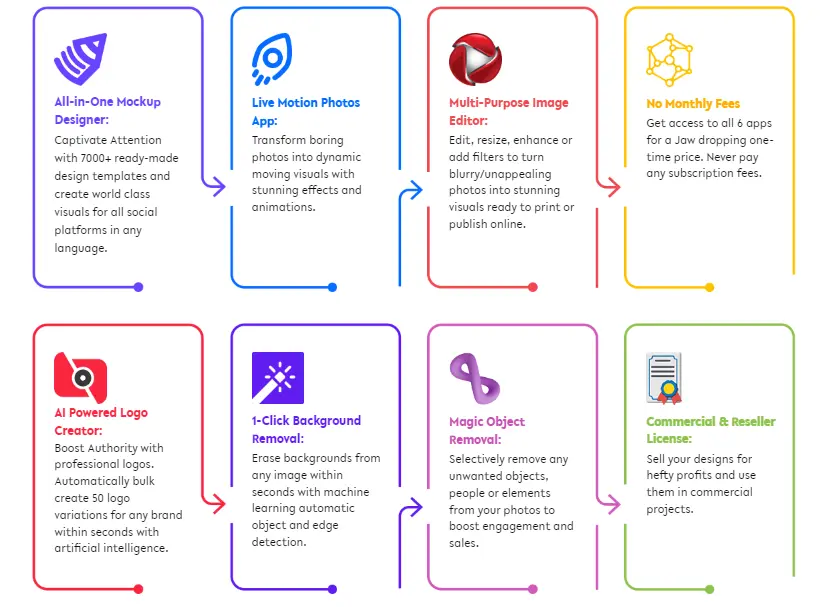
- Multi-Purpose Image Editor: Edit, enhance, and transform images using an intuitive interface. Crop, resize, and adjust colors with ease.
- Logo Maker: Create unique logos with a vast library of icons, fonts, and design elements. No design skills are needed.
- Background Remover: Remove backgrounds from images in seconds, perfect for creating transparent PNGs.
- Mockup Creator: Generate realistic mockups for products, websites, and presentations. Choose from a variety of templates.
The table below summarizes some of the key design tools available in DesignBeast:
| Tool | Function |
|---|---|
| Image Editor | Edit and enhance images |
| Logo Maker | Create custom logos |
| Background Remover | Remove image backgrounds |
| Mockup Creator | Generate realistic mockups |
Designbeast Animation Tools
DesignBeast also excels in animation, providing tools that bring your visuals to life. Whether you are creating marketing videos or social media content, these animation tools are invaluable. Key features include:
- Animated Ads Builder: Create eye-catching animated ads for various platforms. Customize animations with text, images, and effects.
- 3D Live Motion Photos: Convert static photos into dynamic, moving images. Add motion effects to create stunning visuals.
- Explainer Video Maker: Produce professional explainer videos with a wide range of templates. Perfect for tutorials and presentations.
- Text-to-Speech: Convert text into natural-sounding speech for your videos. Choose from multiple voice options.
Below is a table summarizing the main animation tools available:
| Tool | Function |
|---|---|
| Animated Ads Builder | Create animated ads |
| 3D Live Motion Photos | Convert photos to moving images |
| Explainer Video Maker | Create explainer videos |
| Text-to-Speech | Convert text to speech |
Templates Galore
DesignBeast stands out with its extensive library of templates. These templates cover a wide range of categories, making it easy to start your project. Key template categories include:
- Social Media Templates: Pre-designed templates for platforms like Instagram, Facebook, and Twitter. Customize them to fit your brand.
- Marketing Materials: Templates for flyers, brochures, and business cards. Perfect for both online and offline marketing campaigns.
- Website Graphics: Create stunning website banners, headers, and buttons with these templates. Ensure a professional web presence.
- Video Templates: Pre-made video templates for intros, outros, and promotional videos. Save time and create professional videos quickly.
Here’s a quick overview of the main types of templates available:
| Template Type | Category |
|---|---|
| Social Media | Instagram, Facebook, Twitter |
| Marketing Materials | Flyers, brochures, business cards |
| Website Graphics | Banners, headers, buttons |
| Video Templates | Intros, outros, promos |

Credit: www.youtube.com
Benefits
Designbeast is an all-in-one design and animation software that promises to revolutionize the way you create stunning visuals. This review delves into the numerous benefits of using Designbeast for your projects. Whether you’re a seasoned designer or a beginner, the software offers a plethora of advantages that can enhance your creative process and output.
Time-saving
One of the most significant benefits of Designbeast is its ability to save you precious time. The software comes with a user-friendly interface that allows you to create professional designs quickly. You don’t need to spend hours learning complex tools or techniques. With its intuitive drag-and-drop features, you can easily bring your ideas to life.
- Ready-made templates: Designbeast offers a vast library of pre-designed templates that you can customize to fit your needs. This feature eliminates the need to start from scratch, saving you countless hours.
- Automated animations: The software includes automated animation features that allow you to create stunning animations with just a few clicks. This reduces the time spent on manual animation tasks.
- Batch processing: You can edit multiple files at once, streamlining your workflow and boosting productivity.
Below is a table summarizing the key time-saving features:
| Feature | Benefit |
|---|---|
| Ready-made templates | Quick customization and design creation |
| Automated animations | Fast animation creation |
| Batch processing | Efficient editing of multiple files |
Professional Results
Designbeast enables you to achieve professional-quality results, regardless of your skill level. The software is equipped with advanced tools that help you create high-quality graphics and animations. These tools ensure your designs look polished and professional.
- High-resolution exports: Export your designs in high resolution, ensuring they look crisp and clear on any platform.
- Advanced editing tools: Use advanced tools like background removal, image enhancement, and color correction to perfect your designs.
- Custom fonts and graphics: Access a wide range of custom fonts and graphics to make your designs stand out.
Professional results are not just about aesthetics but also about functionality. Designbeast ensures your designs are both visually appealing and functional, making them suitable for various professional uses.
Versatility
Designbeast stands out for its versatility, offering features that cater to a wide range of design needs. Whether you need to create social media graphics, website banners, or promotional videos, Designbeast has got you covered.
- Multiple design formats: Create designs in various formats such as JPEG, PNG, GIF, and MP4, making it easy to use across different platforms.
- Wide range of tools: From graphic design to animation and video editing, Designbeast offers tools that cover all aspects of design.
- Suitable for all skill levels: Whether you’re a beginner or an expert, the software provides features that are easy to use yet powerful enough for advanced users.
The table below highlights the versatile features of Designbeast:
| Feature | Application |
|---|---|
| Multiple design formats | Social media, websites, print, and more |
| Wide range of tools | Graphic design, animation, video editing |
| Suitable for all skill levels | Beginner to expert |
User Experience
Designbeast Review – Design & Animation Software is creating a buzz in the digital world. The software promises to be a game-changer for designers and animators. But what truly sets it apart? Let’s dive into the user experience to understand how it stands out.
Ease Of Use
Designbeast offers an intuitive interface that even beginners can navigate easily. The dashboard is clean and clutter-free. This helps users focus on their projects without distractions. Here are some key points about its usability:
- Drag-and-drop functionality simplifies the design process.
- Tooltips and guides are available to assist new users.
- Minimal learning curve, making it accessible to all skill levels.
Moreover, users can quickly access a library of templates. This feature speeds up the design process significantly. The software also includes a step-by-step tutorial for each tool. This ensures that users can make the most out of every feature.
For those who prefer a hands-on approach, Designbeast offers a sandbox mode. This allows users to experiment with different tools and effects without affecting their main projects. Overall, its ease of use makes it a top choice for designers of all levels.
Customization Options
Customization is a strong suit of Designbeast. It offers a wide range of options to tailor your projects to your specific needs. Here are some features that stand out:
- Extensive template library with customizable elements.
- Ability to adjust colors, fonts, and sizes with ease.
- Layer management for complex designs.
Users can also upload their own assets, such as images and fonts. This adds a personal touch to every project. The software supports a variety of file formats, making it versatile for different needs.
Another remarkable feature is the animation customization. Users can tweak animation paths, speeds, and transitions. This ensures that the final output matches the envisioned design. Whether it’s a simple graphic or a complex animation, Designbeast provides the tools for full customization.
Integration Capabilities
Designbeast excels in integration capabilities, making it a versatile tool. It seamlessly integrates with popular platforms, enhancing its functionality. Here are some key integrations:
- Social media platforms like Facebook, Instagram, and Twitter.
- Content management systems (CMS) such as WordPress.
- Cloud storage services like Google Drive and Dropbox.
These integrations allow users to import and export assets effortlessly. This saves time and ensures a smoother workflow. For businesses, the software supports integration with email marketing tools. This makes it easy to design and send out visually appealing newsletters.
The API access provided by Designbeast is another standout feature. It allows developers to create custom integrations tailored to specific needs. This flexibility ensures that the software can adapt to various business requirements.
Overall, the integration capabilities of Designbeast enhance its usability and make it a comprehensive tool for designers and businesses alike.
Who Should Use Designbeast?
DesignBeast is a powerful design and animation software that caters to a wide range of professionals. This tool combines multiple design tools into a single platform, making it incredibly versatile. But who should use DesignBeast? Let’s explore the different groups that can benefit from this innovative software.
Graphic Designers
Graphic designers will find DesignBeast indispensable. The software offers a suite of tools that streamline the design process. Whether you’re working on logos, social media graphics, or website designs, DesignBeast has you covered.
Get DesignBeast For $69 One-Time Price
(Use Coupon “BEAST” For $20 OFF)
Key Features for Graphic Designers:
- Drag-and-drop interface for easy design.
- Thousands of pre-made templates for quick projects.
- Advanced photo editing tools for professional-quality images.
- Multiple layers and effects to bring your designs to life.
Benefits:
| Feature | Benefit |
|---|---|
| Template Library | Save time with pre-made designs. |
| Photo Editor | Enhance images with ease. |
| Layer Management | Create complex designs effortlessly. |
Graphic designers can elevate their work with DesignBeast’s versatile tools, making it easier to meet client expectations and deadlines.
Marketers
Marketers will find DesignBeast to be a game-changer. The software allows for the creation of compelling visuals that can boost engagement and drive sales. With its user-friendly interface, marketers can produce high-quality graphics without needing extensive design skills.
Essential Tools for Marketers:
- Social media post templates for quick content creation.
- Banner ad designs to capture attention.
- Infographic creator for data visualization.
- Animated video maker to enhance marketing campaigns.
Advantages:
- Enhance brand visibility with professional graphics.
- Improve conversion rates with engaging visuals.
- Save money by reducing the need for external designers.
Marketers can leverage DesignBeast to craft visually appealing content that resonates with their audience, ultimately driving better results for their campaigns.
Content Creators
Content creators will appreciate the flexibility and power of DesignBeast. Whether you’re a blogger, YouTuber, or social media influencer, this software offers tools that help you create stunning visuals and animations to complement your content.
Tools for Content Creators:
- Thumbnail creator for eye-catching YouTube videos.
- Blog graphics to enhance written content.
- Social media templates for consistent branding.
- GIF maker to add fun elements to your posts.
Perks:
- Increase audience engagement with high-quality visuals.
- Stand out on social media with unique designs.
- Save time with easy-to-use tools and templates.
Content creators can use DesignBeast to produce visually appealing content that attracts more viewers and followers, enhancing their online presence.
Comparison With Competitors
DesignBeast is an innovative design and animation software that aims to revolutionize the creative industry. With its extensive features and user-friendly interface, it promises to cater to both beginners and professionals. But how does it stack up against the competition? This section will explore the comparison with two major competitors, Canva and Adobe Creative Cloud.
Designbeast Vs. Canva
Canva is a popular choice for many due to its ease of use and vast template library. But DesignBeast brings several unique advantages to the table.
- Comprehensive Features: DesignBeast offers a wider range of design and animation tools compared to Canva.
- 3D Animation: While Canva excels in 2D design, DesignBeast includes 3D animation capabilities.
- AI-powered Tools: DesignBeast integrates AI to streamline design tasks, which Canva lacks.
| Feature | DesignBeast | Canva |
|---|---|---|
| 3D Animation | Yes | No |
| AI Tools | Yes | No |
| Template Variety | Extensive | Moderate |
| User Interface | Intuitive | User-friendly |
DesignBeast stands out with its advanced animation features and AI integrations. Canva remains excellent for quick, straightforward designs, but DesignBeast offers more for complex projects.
Designbeast Vs. Adobe Creative Cloud
Adobe Creative Cloud is the industry standard for professional design and animation. Comparing it with DesignBeast reveals some interesting points.
- Cost: Adobe Creative Cloud is subscription-based, making it expensive over time. DesignBeast offers a one-time purchase model.
- Ease of Use: Adobe tools have a steep learning curve, whereas DesignBeast is more accessible for beginners.
- Feature Set: Adobe Creative Cloud provides an extensive suite of tools, but DesignBeast covers essential features needed by most users.
| Feature | DesignBeast | Adobe Creative Cloud |
|---|---|---|
| Cost | One-time | Subscription |
| Learning Curve | Easy | Challenging |
| Tool Variety | Comprehensive | Extensive |
| Animations | Yes | Yes |
Adobe Creative Cloud is powerful but can be overwhelming and costly. DesignBeast offers a more affordable and user-friendly alternative with all the necessary tools for high-quality design and animation.
Pricing
Designbeast Review – Design & Animation Software is a comprehensive tool that has taken the design world by storm. With its wide range of features and user-friendly interface, it has become a favorite among designers and animators. But what about its pricing? Let’s delve into the different subscription options and evaluate if it offers value for money.
Get DesignBeast For $69 One-Time Price
Subscription Options
Designbeast offers multiple subscription options to cater to various needs and budgets. Whether you’re a freelancer, a small business owner, or part of a larger organization, there is a plan for you. Here are the main subscription plans:
- Basic Plan: This plan is perfect for beginners. It includes access to essential design tools and templates. Priced at just $29 per month, it’s affordable and packed with value.
- Pro Plan: Ideal for professional designers, this plan offers advanced features. It includes unlimited access to all design and animation tools, plus priority customer support. At $49 per month, it’s a solid choice for those seeking more capabilities.
- Enterprise Plan: Tailored for large teams and organizations, this plan provides extensive resources. It includes team collaboration tools, dedicated account management, and custom solutions. The price is $99 per month, reflecting its premium offerings.
For those wanting to test the waters, Designbeast also offers a free trial. This allows potential users to explore the software’s features before committing to a subscription. It’s a great way to understand what you are getting into without any financial commitment.

Value For Money
When considering if Designbeast offers value for money, it’s essential to look at the features provided in each plan. The Basic Plan, at $29 per month, gives access to a wide range of tools that can help beginner designers create stunning visuals. This plan is cost-effective and provides a good starting point.
The Pro Plan, priced at $49 per month, includes advanced features that cater to professional needs. The ability to access unlimited design and animation tools, along with priority support, makes it a worthwhile investment. For professionals who rely on design software daily, this plan provides excellent value.
The Enterprise Plan, at $99 per month, is designed for large teams and organizations. The added benefits of team collaboration tools and dedicated account management ensure smooth workflow and efficient project management. Although it comes at a higher price, the extensive features justify the cost for larger entities.
Below is a comparison table to illustrate the value provided by each plan:
| Plan | Price | Features |
|---|---|---|
| Basic | $29/month | Essential tools, Templates, Free Trial |
| Pro | $49/month | All tools, Unlimited access, Priority support |
| Enterprise | $99/month | Team tools, Account management, Custom solutions |
Overall, Designbeast provides various pricing plans that offer flexibility and value. Whether you’re just starting or need advanced features for a large team, there’s a plan that fits your needs.

Credit: in.pinterest.com
Frequently Asked Questions
What Is Designbeast Software?
Designbeast is a versatile design and animation software. It offers tools for creating stunning graphics, animations, and designs. Its user-friendly interface caters to both beginners and professionals.
Can Beginners Use Designbeast Easily?
Yes, beginners can use Designbeast easily. The software features an intuitive interface and step-by-step tutorials. It requires no prior design experience, making it accessible to everyone.
What Features Does Designbeast Offer?
Designbeast offers a variety of features. These include 3D live motion photos, logo creation, and mockup design. It also includes image editing, background removal, and animation tools.
Is Designbeast Compatible With All Devices?
Designbeast is a cloud-based software. It is compatible with any device that has internet access. You can use it on Windows, Mac, and mobile devices.
Conclusion
Designbeast offers a powerful suite for design and animation. Its user-friendly interface makes it accessible for beginners. Advanced features cater to professionals. Overall, it’s a versatile tool for all your creative needs. Give Designbeast a try and elevate your design projects today.

1 thought on “Designbeast Review – Ultimate Design & Animation Suite!”
Your article helped me a lot, is there any more related content? Thanks!