

The best email tracking software for Outlook is Xink, as it offers comprehensive tracking features and integrates seamlessly with Outlook, providing real-time notifications and analytics. Managing email communication efficiently is crucial for businesses and professionals.
With the increasing reliance on email as a primary communication tool, knowing if and when your emails are being opened and read can provide valuable insights. That’s where email tracking software comes in. While there are several options available in the market, one software that stands out for Outlook users is Xink.
Xink offers a user-friendly interface and a range of features that allow you to track email opens, clicks, and conversions directly within Outlook, providing real-time notifications and analytics. This ensures that you can stay on top of your email communication and optimize your outreach efforts effectively.
Factors To Consider When Choosing Email Tracking Software For Outlook
Choosing the right email tracking software for Outlook is crucial for individuals and businesses who rely on their emails for effective communication and follow-ups. With so many options available in the market, it can be overwhelming to make the best choice.
However, considering a few key factors can simplify the decision-making process. In this article, we will explore the factors you should keep in mind when choosing email tracking software, ensuring it is compatible with Outlook, offers the necessary tracking features, has a user-friendly interface, and prioritizes security and privacy.
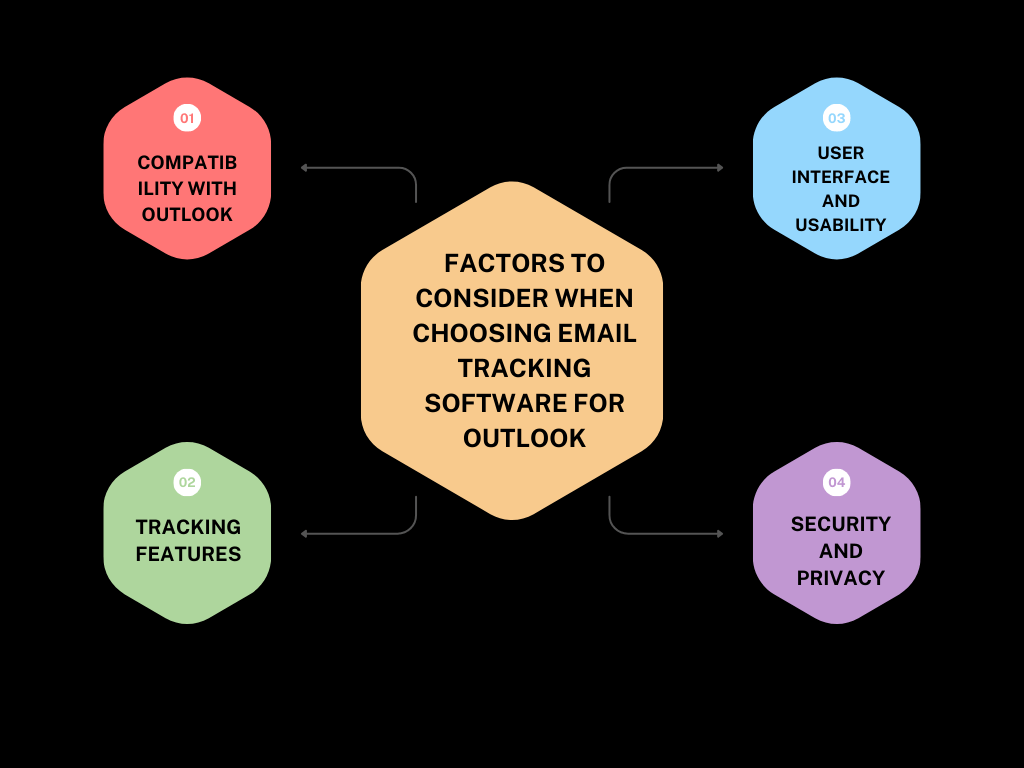
1.1 Compatibility With Outlook
One of the first factors you need to consider when choosing email tracking software is its compatibility with Outlook. Since Outlook is used by millions worldwide, it is important to ensure that the software seamlessly integrates with the platform. This compatibility ensures smooth performance, making it easier for you to track emails directly from your Outlook inbox.
1.2 Tracking Features
Effective email tracking software should offer a comprehensive range of tracking features that meet your specific needs. When evaluating different options, consider the tracking capabilities provided. Look for features such as real-time email open tracking, link click tracking, email scheduling, read receipts, and email analytics. Additionally, consider whether the software offers mobile tracking functionality, allowing you to monitor your emails on the go.
1.3 User Interface And Usability
The user interface and usability of email tracking software play a vital role in ensuring a seamless experience. Nobody wants to spend valuable time trying to navigate a complex interface. Look for software that provides an intuitive and user-friendly interface, making it easy to locate and analyze important tracking data. Consider demos or trials to get a feel for the software’s usability before making your decision.
1.4 Security And Privacy
When dealing with sensitive email communication, security and privacy should be top priorities. Ensure that the email tracking software you choose has robust security measures in place to protect your data and confidential information. Look for features like end-to-end encryption, secure authorization protocols, and compliance with industry standards. Additionally, review the software’s privacy policy to ensure that your data is handled responsibly and is not shared with any third parties without your consent.
1. Constant Contact
If you’re using Outlook for your business emails, you know how important it is to track the performance of your emails. Email tracking software can provide you with valuable insights into your email campaigns, helping you understand who opens your emails when they do it, and what actions they take afterward.
1.1 Overview
When it comes to email tracking software for Outlook, Constant Contact is a top choice for many businesses. With its user-friendly interface and robust features, it offers everything you need to track and analyze your email campaigns.
1.2 Key Features
Constant Contact provides a wide range of features that make email tracking a breeze. Here are some of the key features:
- Email Open Tracking: You can see who opens your emails and when they do it, helping you identify engaged contacts.
- Link Tracking: Constant Contact tracks the clicks on your email links, allowing you to measure the effectiveness of your email content.
- Real-Time Reporting: Get instant access to real-time reports on email open rates, click-through rates, and more.
- Contact Management: Keep all your contact information organized in one place, making it easy to track individual contact engagement.
- A/B Testing: Test different subject lines, content, and design elements to optimize your email performance.
1.3 Pricing
Constant Contact offers flexible pricing plans to suit businesses of all sizes. Their pricing is based on the number of contacts you have, and they offer a 60-day free trial for new users. Here is an overview of their pricing plans:
| Plan | Price |
|---|---|
| Lite | $12/month |
| $35/month | |
| Email Plus | $80/month |
With Constant Contact, you can start with a plan that fits your needs and easily upgrade as your business grows.
2.cirrus Insight
Cirrus Insight is a powerful email tracking software specifically designed for Microsoft Outlook users. With its seamless integration, this tool enhances your productivity by providing real-time insights and detailed analytics right within your Outlook inbox. Whether you are a salesperson, marketer, or business professional, Cirrus Insight equips you with the necessary data to stay on top of your email game.
What sets Cirrus Insight apart from other email tracking software is its extensive range of features tailored for Outlook users. Let’s take a closer look at some of its key features:
- Email Tracking: Gain valuable insights by tracking when your emails are opened, how many times they are viewed, and which links are clicked. This data empowers you to gauge recipient engagement and make data-driven decisions for follow-ups.
- Email Templates: Streamline your email communication with customizable templates. Save time by accessing predefined templates for common scenarios, ensuring consistent messaging across your team.
- Meeting Scheduler: Say goodbye to back-and-forth scheduling headaches. Cirrus Insight’s meeting scheduler seamlessly integrates with your Outlook calendar, allowing recipients to select meeting times that work for them, eliminating the hassle of coordinating schedules.
- Contact and Lead Management: Keep track of your contacts and leads within Outlook by syncing them with CRM platforms like Salesforce. Capture vital information, add notes, and stay organized without leaving your inbox.
- Analytics and Reporting: Gain a comprehensive overview of your email performance through detailed analytics and reports. Understand your open rates, response rates, and engagement metrics, helping you optimize your email strategy for maximum impact.
Cirrus Insight offers flexible pricing plans to cater to different business needs. Below is an overview of their pricing options:
| Plan | Price |
|---|---|
| Salesforce Sync | $14 per user/month |
| Pro | $21 per user/month |
| Expert | $49 per user/month |
Each plan comes with its own set of features, allowing you to choose the one that best suits your requirements. Contact Cirrus Insight directly for more information on their custom pricing options for teams.
3. Yesware – Powerful Email Tracking Software
Yesware is a powerful email tracking software that is compatible with Outlook. It allows users to track email opens, clicks, and replies, helping them to optimize their email campaigns and improve their communication with clients.
When it comes to email tracking software for Outlook, Yesware is one of the most powerful tools available. Whether you are a salesperson trying to close deals or a marketer looking to improve your email outreach, Yesware provides the features and insights you need to make the most of your email communication.
3.1 Overview
Yesware is a comprehensive email tracking software that seamlessly integrates with Microsoft Outlook. It offers a range of powerful features designed to help professionals track, analyze, and optimize their email campaigns. With Yesware, you can gain valuable insights into who opens your emails, when they open them, and how they engage with your content. This allows you to follow up with the right people at the right time and ultimately increase your email productivity.
3.2 Key Features
Yesware comes equipped with a robust set of features that enhance your email tracking experience. Some of its key features include:
- Real-time email tracking: Yesware provides real-time notifications when your emails are opened, clicked, or replied to, giving you instant insights into recipient engagement.
- Email templates: With Yesware, you can create and save email templates, saving you valuable time when crafting personalized messages.
- Email scheduling: Schedule emails to be sent at specific times, ensuring your messages reach recipients when they are most likely to engage.
- Attachment tracking: Track opens and clicks on attachments, allowing you to measure recipient interest in your shared files.
- CRM integration: Yesware seamlessly integrates with popular CRM platforms like Salesforce, allowing you to sync email data and streamline your workflow.
3.3 Pricing
Yesware offers flexible pricing plans to suit different user needs. The pricing tiers include:
| Plan | Price | Features |
| Free Forever | $0 Seat / month | Basic Email Open Tracking,Basic Attachment Tracking,Campaign Recipients/Month |
| Pro | $15 per user per month |  Unlimited Email Open TrackingUnlimited Email Link TrackingUnlimited Attachment Tracking20 Campaign Recipients/MonthPersonal Activity ReportRecipient Engagement ReportEmail and Phone Support Unlimited Email Open TrackingUnlimited Email Link TrackingUnlimited Attachment Tracking20 Campaign Recipients/MonthPersonal Activity ReportRecipient Engagement ReportEmail and Phone Support |
| Premium | $35 Seat / month |  Remove Yesware BrandingUnlimited CampaignsUnlimited TeamsShared Templates & CampaignsTeam ReportingCentralized Team BillingCustomer Success On-Demand Remove Yesware BrandingUnlimited CampaignsUnlimited TeamsShared Templates & CampaignsTeam ReportingCentralized Team BillingCustomer Success On-Demand |
| Enterprise | $65 Seat / month |  Salesforce Inbox SidebarSalesforce Email Sent SyncSalesforce Email Reply SyncSalesforce Calendar SyncSalesforce Background SyncBi-Directional Activity SyncAdd Contacts to CampaignsImport List Views to CampaignsSalesforce Single Sign-OnTrusted IP Ranges Salesforce Inbox SidebarSalesforce Email Sent SyncSalesforce Email Reply SyncSalesforce Calendar SyncSalesforce Background SyncBi-Directional Activity SyncAdd Contacts to CampaignsImport List Views to CampaignsSalesforce Single Sign-OnTrusted IP Ranges |
| Custom Plan | Custom pricing |  Security ReviewLegal ReviewSalesforce Force Sync OnManaged Package ReportingSalesforce CustomizationsSalesforce Event Type / Calendar SyncPrefer Salesforce Contacts over LeadsScan Salesforce Alternative Email FieldRingCentral Telephony IntegrationPay by InvoiceDedicated Customer Success Manager Security ReviewLegal ReviewSalesforce Force Sync OnManaged Package ReportingSalesforce CustomizationsSalesforce Event Type / Calendar SyncPrefer Salesforce Contacts over LeadsScan Salesforce Alternative Email FieldRingCentral Telephony IntegrationPay by InvoiceDedicated Customer Success Manager |
By offering a range of pricing options, Yesware ensures that professionals of all levels can leverage the power of its email tracking software without breaking the bank.
4. Contact Monkey
“Contact Monkey” is one of the best email tracking software for Outlook that can greatly enhance your email productivity. With its array of impressive features and seamless integration with Outlook, Contact Monkey is the go-to solution for professionals who want to track their emails effectively.
4.1 Overview
Contact Monkey is an email tracking software that allows you to track your emails right from within Outlook. It provides insightful data about your emails, such as the number of opens, clicks, and replies, so you can measure the effectiveness of your communication. By knowing when your emails are being read and how recipients are interacting with them, you can prioritize follow-ups and improve your overall email strategy.
4.2 Key Features
Contact Monkey offers a range of key features that make it stand out from other email tracking software:
- Real-Time Notifications: Contact Monkey sends you instant notifications when your emails are opened, allowing you to take immediate action and follow up at the right time.
- Email Scheduling: With Contact Monkey, you can schedule your emails to be sent at a specific date and time, ensuring that your messages reach recipients at the most opportune moment.
- Link click tracking: The software tracks when recipients click on the links within your emails, providing invaluable insights into their engagement and areas of interest.
- Email Templates: Contact Monkey offers customizable email templates that help you save time and maintain consistency in your communication.
- Team Collaboration: Easily collaborate with your team by sharing email templates, tracking data, and performance metrics, all within a user-friendly interface.
4.3 Pricing
Contact Monkey offers flexible pricing plans to suit different needs:
| Plan | Features | Price |
|---|---|---|
| Basic | Track opens, clicks, and replies | $15 per user/month |
| Pro | Advanced tracking features, email scheduling | $25 per user/month |
| Enterprise | Integrate with CRM systems, team collaboration | Custom pricing |
With Contact Monkey’s wide range of features and affordable pricing plans, it is the perfect email tracking software for Outlook users. Boost your email productivity, improve your communication strategy, and stay on top of your email game with Contact Monkey.
5. Hubspot
HubSpot is a popular email tracking software that seamlessly integrates with Outlook, ensuring you have complete visibility into your email campaigns. With a comprehensive set of features and a user-friendly interface, HubSpot empowers you to maximize the effectiveness of your email outreach.
5.1 Overview
HubSpot is known for its innovative inbound marketing solutions, and their email tracking software is no exception. This powerful tool provides real-time insights into how your email recipients engage with your messages, allowing you to refine your approach and make data-driven decisions.
5.2 Key Features
HubSpot offers a range of impressive features that make tracking your emails a breeze:
- Activity Tracking: Gain a deep understanding of how recipients interact with your emails. Track opens, clicks, and even the time spent reading each message. This invaluable data helps you identify what resonates with your audience and refine your email strategy accordingly.
- Notification Alerts: Stay informed about important email activity with real-time notifications. Whenever a recipient opens or clicks on your email, you’ll receive an instant notification, allowing you to quickly follow up while your message is fresh in their mind.
- Email Scheduling: Plan your email outreach effectively by scheduling messages to be sent at the optimal time. HubSpot’s email tracking software allows you to queue up your emails and ensure they are delivered when they are most likely to be read.
- Email Templates: Streamline your communication by using customizable email templates. HubSpot offers a library of professionally designed templates that can be easily personalized to match your brand’s style and tone.
- Analytics and Reporting: Measure the success of your email campaigns with detailed analytics and reports. HubSpot provides comprehensive insights into key metrics such as open rates, click-through rates, and engagement trends, enabling you to continuously optimize your email marketing strategy.
5.3 Pricing
HubSpot offers flexible pricing options to cater to businesses of all sizes. Their plans start from $50 per month and increase in features and functionality as you move up to higher tiers. Whether you’re a small business looking to track basic email metrics or a large enterprise with complex email marketing needs, HubSpot has a plan that suits you.
FAQ For Best Email Tracking Software For Outlook
What Is Email Tracking Software?
Email tracking software allows users to monitor the delivery and open status of their email messages. It provides valuable insights into recipient engagement, such as when and how many times an email was opened, links clicked, and attachments viewed. This helps users gauge the effectiveness of their email campaigns and improve communication efficiency.
How Does Email Tracking Software Work?
Email tracking software works by embedding a unique tracking pixel or code snippet into the body of an email. When the recipient opens the email, the tracking code sends a signal to the software, which records the activity. The software then generates reports and notifications to provide real-time data on email opens, link clicks, and other relevant metrics.
What Are The Benefits Of Using Email Tracking Software?
Using email tracking software offers several benefits. First, it allows you to know if and when your email has been opened, helping you determine the right time to follow up. Second, it provides insights into recipient engagement, allowing you to tailor your communication strategy.
Finally, it helps you track the success of your email campaigns and improve your overall email efficiency.
Can Email Tracking Software Track Attachments?
Yes, email tracking software can track attachments. It can provide information on whether the recipient has opened, viewed, or downloaded attachments, allowing you to gauge their interest and engagement. This feature is especially useful for sales teams or businesses that frequently send important documents or files via email.
Conclusion
Finding the best email tracking software for Outlook can greatly enhance your productivity and effectiveness in managing your emails. With features like real-time tracking, email analytics, and email scheduling, these software options provide valuable insights and streamline your communication process.
By leveraging these tools, you can make informed decisions, prioritize important emails, and ultimately improve your overall email management experience. Implementing the right email tracking software can be a game-changer for professionals who heavily rely on Outlook for their daily communication needs.
Choose wisely and watch your efficiency soar!

1 thought on “Boost Productivity with the Best Email Tracking Software for Outlook”
I don’t think the title of your article matches the content lol. Just kidding, mainly because I had some doubts after reading the article.